


To claim your business in ChatGPT, sign in, open Business Hub at chatgpt.com/business-hub, search for your business, and verify ownership by phone, email, domain or Shopify. After identity verification, you can update your profile and view Insights showing mentions, website clicks and discovery topics for the past 28 days.
On November 10, 2026, OpenAI launched Businesses in ChatGPT, a beta that lets companies claim the profile ChatGPT shows for them, correct its details and see how often ChatGPT sends people to their website. The dashboard behind it is called Business Hub. For marketers, it is the first official look at a channel that has mostly been measured by guesswork.
This guide covers how to claim your profile, how to read the numbers and where those numbers stop being useful, so you can set up tracking that holds up in a budget conversation.
Key Takeaways
- Businesses in ChatGPT launched in beta on November 10, 2026. Claiming happens in Business Hub at chatgpt.com/business-hub.
- Claiming requires verifying ownership (phone, email, domain DNS or Shopify, depending on the business) and then completing identity verification.
- Insights cover the past 28 days: mentions, website clicks and discovery topics. They are aggregated and appear only above reporting thresholds.
- Clicks are not confirmed visits or sales, so pair Business Hub with your own analytics.
- Claiming fixes your facts. Earning recommendations still depends on content, authority and consistency.
What Is a ChatGPT Business Profile?
A ChatGPT business profile is the page ChatGPT uses to describe a business. Once claimed, the owner can manage details such as the business name, website, category, description, logo and, for sellers, delivery and return policies. Eligible businesses can also add a product feed with pricing and availability.
OpenAI positions the program as a way to reach the 1.2 billion people who use ChatGPT each week and to see how people engage with a business on the platform. VentureBeat reported that claiming needs no ads account or Enterprise agreement.
Who Can Claim a ChatGPT Business Profile?
Owners and authorized representatives can apply through Business Hub. OpenAI says the hub is open to eligible businesses where ChatGPT is available and verification is supported, but it has not published a country list.
Profiles and agents follow different rules. Business Agents, the branded chat that answers customer questions, are limited at launch to eligible U.S. ecommerce and online-service businesses. A business elsewhere may still claim a profile where verification is supported. Because this is a beta, confirm current eligibility inside Business Hub before planning around it.
How to Claim Your Business in ChatGPT, Step by Step
Screens may shift during the beta, but the sequence reported at launch is consistent.
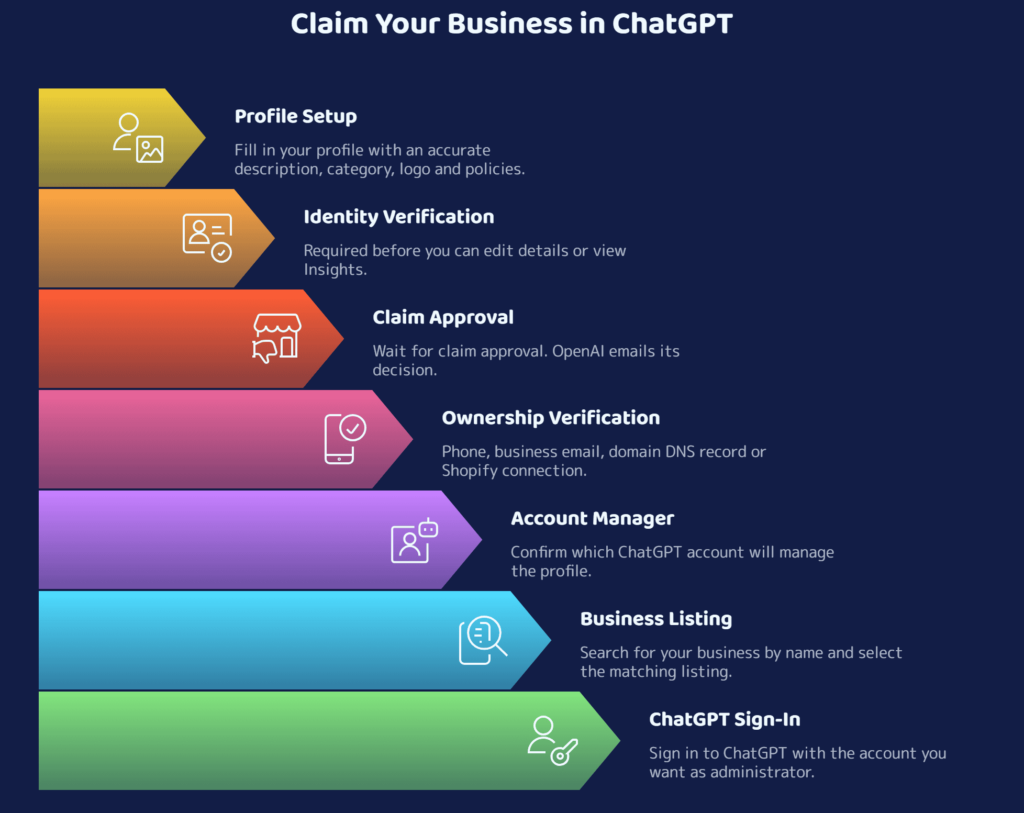
The claiming administrator can invite teammates or an agency, and each person should use their own ChatGPT account. If you choose DNS verification, involve whoever controls your domain early.
How to Prepare Before You Claim
- Pick the administrator carefully: Use a work account with continuity, not one employee’s personal login.
- Confirm who controls your domain, business phone and business email: Verification relies on them.
- Align your facts: Name, address, phone, website and services should match across your site, Google Business Profile and directory listings.
- Write a plain description: State what you do, who you serve and what you offer in short, declarative sentences.
- Record a baseline: Note current organic traffic and any chatgpt.com referrals so later changes mean something.
Claiming corrects facts. It does not by itself make ChatGPT recommend you. That depends on content, authority and consistency, which we cover in our guide to getting recommended by ChatGPT.
How to Track AI Visibility With ChatGPT Insights
After approval, open your business in Business Hub and select Insights. OpenAI’s help documentation says Insights show aggregate activity over the past 28 days, including mentions and website clicks. OpenAI’s launch screenshot also shows profile views and a seven-day view.
- Mentions: For online businesses, a mention occurs when ChatGPT includes a reference to their website in its response. For a local business, it counts when ChatGPT shows a result for your location, even if nobody opens it.
- Website clicks: Clicks from ChatGPT through to your site.
- Discovery topics: Common themes in conversations where your website is cited.
Treat discovery topics as free research. They show what ChatGPT associates with your site, which you can compare against the pages you actually have. If the themes are thin or off-target, the fix is content, and why B2B brands go missing in ChatGPT is a good starting point.
Business Hub vs. Your Own Measurement
| Question | Business Hub shows | You still need |
| How often does ChatGPT cite my site? | Mentions, as 28-day totals | A monthly snapshot to build a trend |
| Are people clicking through? | Website clicks | Sessions from chatgpt.com referrals in your analytics |
| Did visitors convert? | Not tracked | Lead and conversion tracking on landing pages |
| What themes bring me up? | Top discovery topics | A review of those themes against your pages |
| Is ChatGPT describing me accurately? | Only the profile fields you control | A monthly sample of customer-style prompts |
What Business Hub Insights Can’t Tell You
- Clicks are not outcomes: Trade coverage of OpenAI’s help text notes that clicks do not confirm visits or conversions.
- Mentions are narrower than they sound: For online businesses, a mention means ChatGPT referenced your website, not that it named your brand.
- The data is aggregated: OpenAI says businesses do not receive individual prompts or consumer conversations, and metrics appear only above reporting thresholds. Smaller businesses may see little data at first.
- Coverage is limited: Independent reviews note the dashboard covers ChatGPT only and shows no competitor comparisons.
That is why attribution still needs your own setup. Our piece on what smart companies measure instead of broken attribution explains how to build it.
A Simple Monthly Tracking Loop
- Snapshot Insights on the same day each month: mentions, clicks and discovery topics.
- Compare clicks with chatgpt.com referral sessions in your analytics. ChatGPT is reported to add a utm_source=chatgpt.com parameter to links, which makes filtering straightforward.
- Track conversions on the landing pages those visitors reach, using analytics and reporting setup.
- Run a fixed set of 10 to 15 customer-style prompts. Log whether you appear, how you are described and whether the details are correct.
- Fix inaccuracies in your profile and on your site, then repeat.
After three months you have a trend line, which persuades far more than any single dashboard number.
How Champ360 Marketing Approaches AI Visibility Measurement
Champ360 Marketing is an AI-powered, data-driven digital marketing company. Its Precision360 Marketing process is built around the same evidence-first logic this tracking loop needs:
- In-depth audit and competitor analysis to establish where your site stands before anything changes.
- Detailed insights and reporting that turn data into clear priorities.
- Strategic recommendations, execution and ongoing performance monitoring.
- Proprietary AI-driven tools that analyze market trends, keyword insights and phrase trends specific to your domain.
Our search engine optimization services cover the content and authority work that influences how AI tools describe a business.
Want a baseline of how ChatGPT describes your business today? Talk to the Champ360 team.
The Bottom Line
Business Hub gives businesses a first-party view of ChatGPT visibility, and claiming a profile is a low-cost step if you are eligible. Remember what it measures: mentions and clicks, not revenue. Claim the profile, keep your facts accurate and combine the dashboard with your own analytics, so the trend rather than the novelty guides your decisions.
FAQs
How do I claim my business in ChatGPT?
Sign in to ChatGPT, open Business Hub at chatgpt.com/business-hub, search for your business and select it. Verify ownership with the method offered (phone, business email, domain DNS record or Shopify), wait for approval, then complete identity verification to edit your profile and view Insights.
Is claiming a ChatGPT business profile free?
OpenAI lists no fee for claiming a profile, and trade coverage reports it is free at launch without an ads account or Enterprise agreement. Setup screens may promote paid extras, so read each prompt before accepting.
What does ChatGPT Business Hub track?
Insights show mentions, website clicks and discovery topics over the past 28 days, aggregated and shown only above reporting thresholds. OpenAI’s launch screenshot also shows profile views and a seven-day view.
Can I see what people asked ChatGPT about my business?
No. OpenAI says businesses do not receive individual prompts or consumer conversations, including chats with their business agents. Insights are aggregated totals and themes.
Does claiming a profile guarantee ChatGPT will recommend my business?
No. Claiming gives you control over your business details and access to data. OpenAI’s announcement frames it as a way to manage information and see insights, not as a ranking boost. Recommendations still depend on your content, authority and consistency.
Who can build a Business Agent in ChatGPT?
At launch, Business Agents are limited to eligible U.S. ecommerce and online-service businesses. Profiles have separate eligibility, so a business outside the U.S. may still be able to claim a profile where verification is supported.